What is data enrichment?
Also called: data append, contact enrichment, CRM enrichment
Data enrichment means filling in missing or outdated fields on records you already have, for example adding a provider's specialty, NPI, verified email or phone, by matching your records against a more complete, verified data source.
Why it matters for healthcare sales and marketing
Most healthcare CRMs are full of half-complete records: a name and a hospital from a trade show, an email with no specialty, a physician with no NPI. Enrichment turns those into records you can segment, route and reach:
- Segmentation. Adding specialty and taxonomy lets marketing target by clinical focus.
- Routing. Adding practice location and affiliation lets sales operations assign records to the right territory and account.
- Reachability. Adding or re-verifying business email and phone means campaigns reach real inboxes.
- Hygiene. Flagging people who have moved, retired or changed roles keeps the CRM honest.
How it works
- Export the records to enrich, with every identifier you have.
- Match them to a reference source. For U.S. clinicians the NPI is the most reliable match key. Otherwise use email, or name plus organization and address.
- Append the missing fields: specialty and taxonomy, title, practice or hospital, verified business email, phone, address.
- Review the match rate and any conflicts before importing. Decide which source wins when values disagree.
- Repeat on a schedule, because contact data decays continuously.
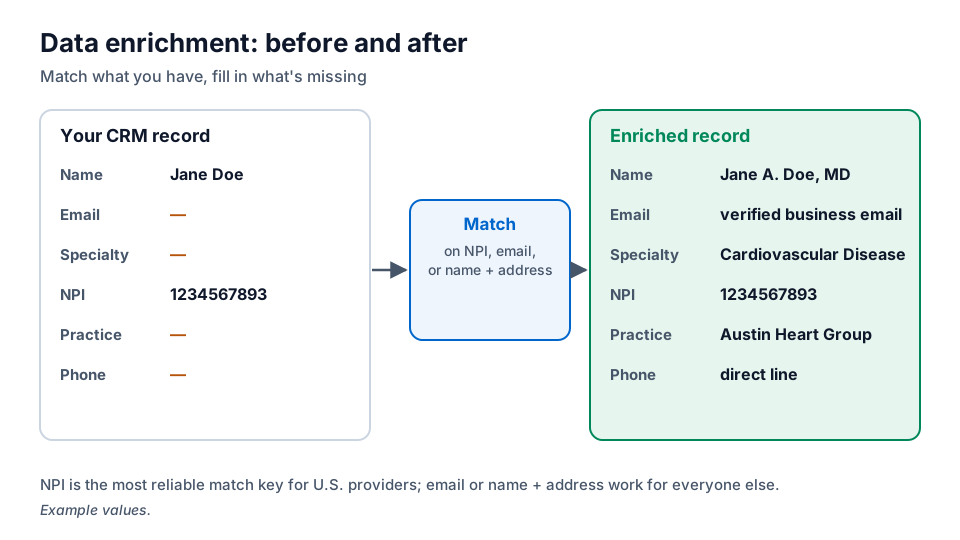
Example
Illustrative scenario. A HealthTech company's HubSpot instance holds thousands of physician contacts from webinars, most with only a name and an email. Marketing Ops sends the file for enrichment. Records are matched on email and on name plus practice, and come back with NPI, specialty, practice and a re-verified email. The team writes the new fields only into empty properties, so nothing reps entered by hand is overwritten. It then builds specialty-based nurture tracks it couldn't run before.
Common mistakes
- Overwriting good data. Decide field by field whether the incoming value or your existing value wins.
- Matching on name alone. Common names create false matches. Use NPI, email or name plus organization.
- Skipping verification. Appending an unverified email can make deliverability worse.
- Enriching once. Without a refresh schedule, the CRM decays back to where it started.
How MedicalProspects does it
Send MedicalProspects the records you already hold and we match them, on NPI where present, to fill in missing fields such as specialty, NPI or a verified business email, and to flag contacts whose details have changed.
Related terms
Put it to work
- Enrichment in our FAQ: how to send records for enrichment
- Data quality methodology: how records are verified
- Ask about enrichment: get a match estimate for your file
Sources
- NPPES NPI Registry, CMS