The Healthcare Email List Buyer's Playbook
How to Vet Data Quality, Deliverability and Compliance Before You Buy
This MedicalProspects eBook shows healthcare marketing and sales teams how to vet a contact data vendor before they buy. It turns vague promises such as "99% deliverable" into contract terms, gives a sample test you can run in a week with your own tools, and ends with a weighted scorecard and RFP template.
Key points
- 12 vendor questions on sourcing, freshness, targeting, guarantees and compliance separate verified data from recycled directory scrapes.
- Deliverability, accuracy and verified mean different things; ask which one a guarantee actually covers.
- Ask for unique counts. Total records across lists can be several times the number of real people.
- Run a custom sample test of 20+ records: independent email checks, NPI registry lookups and manual spot-checks.
- Walk away from red flags such as no custom sample, vague sourcing, count inflation or a guarantee with no remedy.
- Score vendors on price per usable contact, not price per contact, using the weighted scorecard.
What's inside this ebook
-
Introduction: The List Is the Campaign
Most teams spend weeks on a campaign's creative and an afternoon choosing the list it goes to. That's backwards. The healthcare email list you buy decides how a campaign performs before anyone writes a subject line. A great offer sent to the wrong cardiologist, an old practice address or an inbox that bounces still fails, and it fails in ways that are easy to misread.
-
Chapter 1: Why Healthcare Contact Data Goes Stale
Healthcare contact data decays faster than most B2B data. The workforce moves, the organizations it works for keep merging and restructuring, and very few of those changes are announced anywhere a marketer would notice. Before you can judge whether a vendor keeps up, it helps to understand why records break in the first place.
-
Chapter 2: The 12 Questions to Ask Every Healthcare Data Vendor
The fastest way to separate a data compiler from a data reseller is to ask both the same questions and compare the answers. Do it in writing. A vendor with verified data answers specifically and can show its work. A reseller answers with adjectives: "proprietary," "comprehensive," "industry-leading."
-
Chapter 3: Reading Accuracy and Deliverability Guarantees
A guarantee is only as good as its fine print. Most of the confusion comes from three words, accuracy, deliverability and verified, which mean different things but get used as if they were interchangeable. This chapter helps you turn marketing claims into contract terms you can enforce.
-
Chapter 4: How to Run a Sample Test Before You Buy
A custom sample test takes about a week and tells you more than any sales call ever will. The rules are simple: run the same test on every vendor so you're comparing like with like, and score the results before price enters the conversation. Once a number is on the table, it's surprisingly hard not to let it color how you read the sample.
-
Chapter 5: Compliance Due Diligence for List Purchases
Buying professional contact data for B2B outreach is lawful in the U.S. when the data is sourced properly and your messages follow the rules. In our experience, compliance reviews rarely stall on real problems. They stall on a handful of common misunderstandings, and on reviewers having to chase documents one at a time. Settle the misunderstandings early and give your reviewer everything in one pass.
-
Chapter 6: Red Flags and Misleading Claims
Looking back, most bad list purchases showed warning signs before anyone paid. The trouble is that they're easy to explain away in the moment, especially when a deadline is close and the price looks attractive. If you see any of the signs below, either walk away or ask much harder questions. Each one comes with a question designed to bring the problem into the open.
-
Chapter 7: The Vendor Scorecard and RFP Template
A weighted scorecard turns a week of testing into a decision you can explain to your boss, your finance team and, six months from now, yourself. Score each vendor from 1 (weak) to 5 (strong) on every criterion, multiply by the weight and add up the results. The maximum is 500.
-
Chapter 8: Your First 30 Days With a New List
Signing the contract feels like the finish line. It isn't. The value of a list is decided in the month after delivery: how carefully it's loaded, how gently you start sending, whether you use the guarantee you negotiated, and whether you measure the data before you scale. Here's a simple week-by-week plan.
-
Conclusion: Buy Proof, Not Promises
The best healthcare email list isn't the biggest or the cheapest. It's the one that has passed your own tests. Ask the twelve questions, turn guarantees into contract terms, run the sample test, clear compliance early, score every vendor the same way and measure the data in your first thirty days. None of these steps is complicated, and together they take most of the risk out of buying data.
Get the full ebook
All 10 sections, with checklists, tables and templates you can use with your team.
Read the full ebook
The complete text of The Healthcare Email List Buyer's Playbook, the same content as the PDF. Download the PDF above for the designed version with worksheets you can print.
The List Is the Campaign
Most teams spend weeks on a campaign's creative and an afternoon choosing the list it goes to. That's backwards. The healthcare email list you buy decides how a campaign performs before anyone writes a subject line. A great offer sent to the wrong cardiologist, an old practice address or an inbox that bounces still fails, and it fails in ways that are easy to misread.
This playbook is about testing a vendor's data before you pay for it. It's the process we'd want any buyer to follow, including when they're evaluating us.
Healthcare is one of the most valuable B2B audiences you can reach, and one of the hardest to keep accurate. The market is large, highly specialized and in a near-constant state of reorganization.
Every one of those numbers keeps moving. Physicians change employers, practices get acquired, executives change roles and providers retire. A list that was accurate on the day it was compiled can be quietly wrong by the time you send to it, and most buyers only discover that after they've paid. Bounce rates climb, the sending domain's reputation takes a hit, and reps spend their mornings calling people who left months ago.
The good news is that almost all of this is testable in advance. You don't need special tools or a data science team. You need the right questions, a clear reading of the guarantee, and about a week to check a sample properly.
Who this playbook is for
It's written for healthcare marketing, sales and operations teams at MedTech, pharma, biotech, HealthTech, staffing and services companies who buy contact data. It's also for the procurement, legal and privacy reviewers who sign off on those purchases, because the process goes much faster when everyone is working from the same checklist.
How to use it
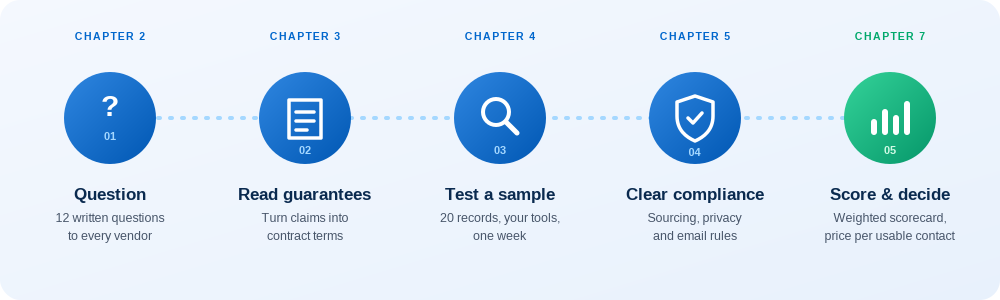
If this is your first serious vendor evaluation, read the chapters in order. If you've bought lists before, jump to the chapter you need. Either way, the appendices give you a one-page checklist and a glossary you can reuse in every evaluation.
- Chapter 1 explains why healthcare data goes stale and what that costs.
- Chapters 2–4 give you the questions, the guarantee language and a one-week sample test.
- Chapter 5 covers compliance due diligence for your legal reviewer.
- Chapter 6 lists the red flags that mean you should walk away.
- Chapter 7 turns everything into a weighted scorecard and an RFP template.
- Chapter 8 covers the first 30 days after you buy, when most value is won or lost.
Chapter 1: Why Healthcare Contact Data Goes Stale
Healthcare contact data decays faster than most B2B data. The workforce moves, the organizations it works for keep merging and restructuring, and very few of those changes are announced anywhere a marketer would notice. Before you can judge whether a vendor keeps up, it helps to understand why records break in the first place.
A market that keeps reorganizing
Two shifts drive most of the change. The first is the move from independent practice into employment. Nearly four in five U.S. physicians (77.6%) are now employed by hospitals, health systems or other corporate entities, and 58.5% of physician practices are owned by those organizations.4 Every time an independent practice joins a system, the email domain changes, the practice address often changes, and the person who signs off on purchases usually changes too. The physician is the same; almost everything a marketer needs to reach them is different.
The second shift is quieter. The federal registry that anchors provider identity depends on providers updating their own records. Covered providers are required to report changes to their NPI record within 30 days,5 but in practice many update only when billing or credentialing forces them to. The registry currently holds about 9.49 million records, of which 340,360 are deactivated.3
Lists don't go out of date all at once. They decay one practice move, one merger and one retirement at a time, and none of that damage is visible on the day you buy.
Five ways a healthcare record breaks
| What changes | What breaks in the record | How you usually find out |
|---|---|---|
| A physician joins a health system | Email domain, practice address, buying authority | Hard bounces, or worse, no signal at all |
| Practices merge or are acquired | Organization name, affiliation, email domain | Wrong-account outreach, missed accounts |
| An executive changes role or employer | Title, department, direct dial | "No longer here" replies, dead phone lines |
| A provider retires or is deactivated | Everything | Wasted outreach, embarrassed reps |
| Specialty is taken from a self-reported title | Specialty and segment | Weak results that look like a messaging problem |
What stale data costs
The costs of stale data show up in three places, and only the first is easy to see.
- Deliverability. Hard bounces tell mailbox providers that a sender is careless. Gmail, for example, asks senders to keep reported spam rates below 0.3% and applies stricter rules to anyone sending more than 5,000 messages a day to Gmail accounts.6 A bad list can push a domain past those lines and drag down every later campaign, including those to good contacts.
- Wasted effort. Reps research, dial and mail people who left months ago. Every hour on a dead record is an hour not spent on a buyer.
- Wrong conclusions. An email that reaches the wrong person still counts as "delivered". Results look weak, and the team blames the message, the offer or the channel. Almost nobody blames the data, so the same list gets used again.
That third cost is the one I'd worry about most. It's the reason good campaigns get cancelled and good copywriters get second-guessed.
Measure decay on your own lists. Track hard-bounce and "no longer here" rates by list source and by month since purchase. Within two or three campaigns you'll see clearly which sources hold up and which decay fastest.
- Physician employment and practice ownership have shifted toward health systems and corporations, so records change often.
- The NPI registry is self-reported; it anchors identity but does not keep contact details current on its own.
- Most record failures are silent. Only bounces and dead lines announce themselves.
- The biggest cost of stale data is pipeline that never forms, not the price of the list.
Chapter 2: The 12 Questions to Ask Every Healthcare Data Vendor
The fastest way to separate a data compiler from a data reseller is to ask both the same questions and compare the answers. Do it in writing. A vendor with verified data answers specifically and can show its work. A reseller answers with adjectives: "proprietary," "comprehensive," "industry-leading."
The twelve questions below cover sourcing, freshness, targeting, guarantees and compliance. For each one, you'll see what a strong answer and a weak answer typically look like.
Sourcing
| Question | A strong answer | A weak answer |
|---|---|---|
| 1. Where does the data come from? | Named source types: the CMS NPI registry, CMS PECOS, state licensing boards, medical society rosters, licensed publication and event partners | "Proprietary sources", "public data", "millions of data points" |
| 2. How many independent sources confirm each record? | Identity, specialty and location must agree across two or three named sources before a record is added | One directory listing, or no answer |
| 3. Do you hold the data or resell someone else's file? | They compile and verify the data themselves and can re-check a record when it bounces | They license a file from a third party and pass it through |
Follow-up probe: ask the vendor to walk you through how one specific record in your sample was built and verified. A real compiler can do this in a few minutes. A reseller usually can't, because they never saw the record being built.
Accuracy and freshness
| Question | A strong answer | A weak answer |
|---|---|---|
| 4. How often is the full database re-verified? | Monthly against primary sources, with faster cycles for high-turnover roles such as executives and IT leaders | "Regularly", "continuously", "annually" |
| 5. When was this specific record last verified? | A last-verified date is available per record | Only a database-wide refresh date |
| 6. How do you remove retired, deactivated or excluded providers? | Automated checks against NPI deactivations and state board filings every cycle | Removal only when a customer reports a problem |
Targeting
| Question | A strong answer | A weak answer |
|---|---|---|
| 7. How do you classify specialty? | Healthcare provider taxonomy codes, the national code set maintained by the NUCC7 | Job titles, self-reported specialty, keyword matching |
| 8. Which filters can I use? | NPI, specialty and subspecialty, facility type, bed size, system affiliation, geography and technology in use | Title and state only |
| 9. What happens when my filters return too few contacts? | They research and verify new records to fill the gap, and tell you | They quietly loosen your criteria |
Guarantees, delivery and compliance
| Question | A strong answer | A weak answer |
|---|---|---|
| 10. What exactly does your deliverability guarantee cover? | A stated percentage on your delivered file, a defined claim window and 1:1 replacement of hard bounces | A database "average" with no remedy |
| 11. Will you send a free custom sample built on my criteria? | Yes, at least 20 records matching your brief, before any payment | A generic file, or a sample only after a deposit |
| 12. How do you handle opt-outs, deletions and privacy rights? | A documented process with response times, and confirmation that no data comes from patient records | No written process |
When the answers are vague
You'll get some fuzzy answers. That isn't always a sign of bad data; sometimes the sales rep simply doesn't know. The fix is to ask again, more narrowly. "Regularly" becomes "How many days since the cardiology file was last re-checked?" "Proprietary sources" becomes "Name three of them." If a second, narrower question still gets an adjective back, treat that as the answer.
Record each vendor's answer to the questions that matter most to you.
- Named sources the vendor listed:
- Re-verification cycle, and the cycle for executives and IT roles:
- How specialty is classified:
- Exact guarantee wording, claim window and remedy:
- Sample size offered, and whether payment is required first:
- Ask the same twelve questions, in writing, to every vendor.
- Strong answers name sources, cycles and processes; weak answers use adjectives.
- Ask the vendor to show how one record in your sample was built and verified.
Chapter 3: Reading Accuracy and Deliverability Guarantees
A guarantee is only as good as its fine print. Most of the confusion comes from three words, accuracy, deliverability and verified, which mean different things but get used as if they were interchangeable. This chapter helps you turn marketing claims into contract terms you can enforce.
Three words, three different promises
- Deliverability means an email address accepts mail and does not hard bounce. It says nothing about whether the right person is behind it.
- Accuracy means the record's details are correct: the right name, title, specialty, organization and address.
- Verified should mean the record was checked against a primary source within a stated window. Ask for the window.
A list can be 99% deliverable and still be badly inaccurate. Imagine a file where half the addresses reach shared inboxes or mailboxes that now belong to someone else. Nothing bounces, and nothing works either. That's why you want all three promises, not just the one that's easiest to measure.
Turning claims into contract terms
| The vendor says | Ask them | A strong answer looks like |
|---|---|---|
| "99% deliverable" | Is that a database average or a promise about my delivered file? | A promise about the file you receive, checked before delivery |
| "Bounce-back guarantee" | Replacement or credit? 1:1? Within what window? | 1:1 replacement of every hard bounce at no extra cost |
| "95% accurate" | Accurate on which fields, measured how? | Named fields, measured against primary sources |
| "Updated regularly" | How often is each record re-checked? | Monthly, with faster cycles for high-turnover roles |
| "Verified contacts" | Verified against what, and when? | NPI registry, licensing board and affiliation sources, with dates |
| "Millions of contacts" | How many unique people after deduplication? | A deduplicated count reported separately from total records |
The anatomy of a strong guarantee
- A stated deliverability percentage that applies to your delivered file
- A clear definition of a hard bounce (permanent failure), separate from soft bounces
- A claim window long enough to run your first sends, for example 30 to 60 days
- A remedy: 1:1 replacement with records that match your criteria, or a credit
- A turnaround time for replacements
- A process for feeding bounces back so the vendor re-checks the source record
The deduplication trap
The same provider can appear on several lists at once. A cardiologist might sit on the cardiology list, a hospital staff list and a group practice list. That's fine, as long as nobody adds the lists together and calls the total an audience. Ask for the unique count. MedicalProspects, for example, reports 15.17 million unique contacts, and notes that list-level counts overlap and should not be added together (October 2026).
Sample contract language
Use language like this as a starting point with your own legal team.
DELIVERABILITY: Vendor warrants that at least 99% of email addresses in each
delivered file will not hard bounce (permanent delivery failure) when first
sent within 60 days of delivery.

REMEDY: Vendor will replace each hard-bounced record 1:1 with a verified record
matching the original criteria within 5 business days of Customer's report,
and will re-verify the source record.

FRESHNESS: Each delivered record will have been verified against primary
sources within the 30 days before delivery. Vendor will provide the
last-verified date for each record on request.
- Deliverability, accuracy and verified are three different promises; get each in writing.
- A guarantee needs a percentage on your file, a bounce definition, a claim window and a remedy.
- Always ask for unique, deduplicated counts.
Chapter 4: How to Run a Sample Test Before You Buy
A custom sample test takes about a week and tells you more than any sales call ever will. The rules are simple: run the same test on every vendor so you're comparing like with like, and score the results before price enters the conversation. Once a number is on the table, it's surprisingly hard not to let it color how you read the sample.
The seven steps
- Write down your exact criteria first. Specialty, role, geography, facility type, practice setting and any exclusions. Send the identical brief to every vendor.
- Ask for a custom sample of at least 20 records. It must match your brief, not be a generic file. MedicalProspects provides 20 custom sample contacts with no payment required.
- Check every email with an independent verification tool. Use the service your team already trusts. Record valid, invalid, catch-all and unknown results per vendor.
- Check identity against the NPI registry. For U.S. clinicians, look up each NPI or name in the free public NPI registry and confirm that specialty and practice location match.
- Spot-check five records by hand. Look at the practice website or hospital directory and the person's professional profile. Is the person still there, in that role?
- Check fit against your criteria. Count how many records match your brief. A sample full of near misses shows how the vendor will fill your full order.
- Score and compare. Enter the results into the scorecard in Chapter 7.
A one-week testing schedule
| Day | What to do | Output |
|---|---|---|
| Monday | Send the identical brief to every shortlisted vendor | Brief sent, deadline set |
| Tuesday–Wednesday | Receive samples; run independent email verification | Valid/invalid/unknown counts |
| Wednesday | NPI registry lookups for clinical records | Identity and specialty match rate |
| Thursday | Manual spot-checks and fit-to-brief count | Spot-check results, fit rate |
| Friday | Score each vendor; ask follow-up questions on anything that failed | Completed scorecard |
What a passing sample looks like
| Check | Pass | Investigate |
|---|---|---|
| Independent email verification | Almost every address valid | Several invalid, or many "unknown" |
| NPI and specialty match | Specialty and location match the registry | Specialty differs, or the NPI is deactivated |
| Manual spot-check | Person still in role | Person left or retired |
| Fit to brief | Every record matches your criteria | Records outside your specialty or region |
Use one copy per vendor.
- Records received, and how many match the brief:
- Email verification: valid / invalid / catch-all / unknown:
- NPI registry: matches / mismatches / deactivated:
- Manual spot-check: confirmed in role, out of 5:
- Questions to send back to the vendor:
- Send one identical brief and test every vendor the same way.
- Use your own verification tool and the public NPI registry, not the vendor's report.
- A refusal to provide a custom sample is an answer.
Chapter 5: Compliance Due Diligence for List Purchases
Buying professional contact data for B2B outreach is lawful in the U.S. when the data is sourced properly and your messages follow the rules. In our experience, compliance reviews rarely stall on real problems. They stall on a handful of common misunderstandings, and on reviewers having to chase documents one at a time. Settle the misunderstandings early and give your reviewer everything in one pass.
HIPAA: what it does and doesn't cover
HIPAA is usually the first word a reviewer raises, and it's worth getting clear on early. HIPAA protects patients' health information held by covered entities and their business associates. A physician's business email, practice address and specialty are professional contact details, not patient data. So the real HIPAA question isn't about the contacts themselves. It's about where the data came from.
| Data | Whose information | Is it protected health information? |
|---|---|---|
| A cardiologist's business email and practice address | The clinician's, as a professional | No |
| A physician's NPI, specialty and hospital affiliation | The clinician's, much of it published by CMS | No |
| A list of patients seen by that cardiologist | Patients' | Yes |
Confirm in writing that your vendor never sources contacts from patient records, clinical systems or covered entities' patient data.
The rules that do apply
| Rule | Where | What it means for your outreach |
|---|---|---|
| CAN-SPAM Act | United States | Accurate headers and subject lines, a physical postal address, and a working opt-out honored within 10 business days that keeps working for 30 days after sending8 |
| Gmail and Yahoo sender rules | Major mailbox providers | Authentication (SPF, DKIM, DMARC), one-click unsubscribe and low complaint rates; stricter rules above 5,000 messages a day to Gmail6 |
| CCPA / CPRA | California | Business contact data has been fully covered since January 1, 2023: honor access, deletion and opt-out requests10 |
| GDPR and UK GDPR | EU and UK | A lawful basis (usually legitimate interests), a notice telling people where you got their data, and rights requests answered within one month |
| ePrivacy rules and PECR | EU and UK | Some countries require prior consent for B2B email; check each target market |
| CASL | Canada | Consent is required; implied consent can apply when a published business address relates to the person's role |
Questions for your vendor
- Are all sources professional and public, or licensed? Is any data drawn from patient records?
- How do you process opt-out and deletion requests, and how fast?
- What lawful basis do you rely on for EU and UK contacts?
- How is data stored and transferred (encryption in transit and at rest)?
- Can you document the source of a specific record if a contact asks?
Your team's own checklist
- One master suppression list shared by every tool, agency and campaign
- A short notice in first-touch emails explaining where you found the contact's details
- Your real company name and a sending domain you own
- Subject lines that match the content
- SPF, DKIM and DMARC set up before the first send
- For B2B outreach, the question is lawful sourcing and compliant messaging, not HIPAA.
- CAN-SPAM penalties apply per email, so build the rules into your templates.
- California treats business contacts like consumers; plan for rights requests.
Chapter 6: Red Flags and Misleading Claims
Looking back, most bad list purchases showed warning signs before anyone paid. The trouble is that they're easy to explain away in the moment, especially when a deadline is close and the price looks attractive. If you see any of the signs below, either walk away or ask much harder questions. Each one comes with a question designed to bring the problem into the open.
| Red flag | Why it matters | The question that exposes it |
|---|---|---|
| Prices that look too good to be true | Verifying healthcare data costs money; very cheap lists are usually scraped or never re-checked | "What does your verification process cost you per record, and how often do you run it?" |
| No custom sample | You cannot test fit or quality | "Can you send 20 records matching this brief before we talk price?" |
| Vague sourcing | No way to judge freshness or legality | "Which named registries and boards do you match against?" |
| Count inflation | Totals quoted as unique people, or niches larger than the profession | "How many unique people match my criteria after deduplication?" |
| A guarantee with no remedy | A percentage you cannot enforce | "What happens, and how fast, when a record bounces?" |
| Title-based specialty | Generalists mixed into specialist lists | "Is specialty based on taxonomy codes or job titles?" |
| Pressure to buy today | Discourages the sample test | "Will the price hold for one week while we test a sample?" |
| Lookalike domains | Impersonation and fraud risk | "Can you confirm this offer from your official domain?" |
Protect yourself from impersonators
As data brands grow, lookalike domains appear, for example .net, .co or .in versions of a real brand. Before you share business details or make a payment, confirm that the website and every email address use the vendor's official domain. MedicalProspects operates only at medicalprospects.com, and official emails always end in @medicalprospects.com. If in doubt, verify through the official contact page.
- Every red flag has a question that brings it into the open; ask it.
- Compare claimed counts with public totals such as the AAMC physician count.
- Verify domains before you share details or pay.
Chapter 7: The Vendor Scorecard and RFP Template
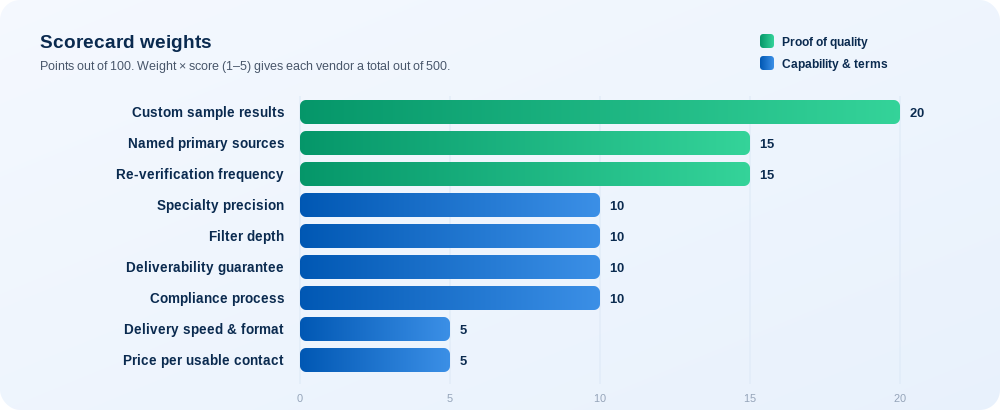
A weighted scorecard turns a week of testing into a decision you can explain to your boss, your finance team and, six months from now, yourself. Score each vendor from 1 (weak) to 5 (strong) on every criterion, multiply by the weight and add up the results. The maximum is 500.
The weights favor what predicts campaign results: proven sample quality, named sources and freshness. Price matters, but only once quality is roughly equal. Feel free to adjust the weights for your situation. Just agree on them internally before the samples arrive, so nobody tunes the scorecard to fit a favorite vendor.
Weighted vendor scorecard
| Criterion | Weight | What earns a 5 | Vendor A | Vendor B | Vendor C |
|---|---|---|---|---|---|
| Custom sample results | 20 | Sample passes every check in Chapter 4 | |||
| Named primary sources (NPI, licensing boards, PECOS) | 15 | Multiple named sources cross-matched per record | |||
| Re-verification frequency | 15 | Monthly, with faster cycles for high-turnover roles | |||
| Specialty precision (taxonomy-based) | 10 | Taxonomy codes and NPI on every clinical record | |||
| Filter depth | 10 | Specialty, facility, bed size, affiliation, technology | |||
| Deliverability guarantee | 10 | Stated % on your file, 1:1 replacement | |||
| Compliance process | 10 | Documented opt-out, deletion and GDPR handling | |||
| Delivery speed and format | 5 | 24–48 hours, CRM-ready fields | |||
| Price per usable contact | 5 | Competitive after adjusting for sample results | |||
| Total (out of 500) | 100 |
A worked example (illustrative)
| Criterion (weight) | Vendor A | Vendor B | Vendor C |
|---|---|---|---|
| Sample results (20) | 5 → 100 | 3 → 60 | 2 → 40 |
| Named sources (15) | 5 → 75 | 3 → 45 | 2 → 30 |
| Re-verification (15) | 5 → 75 | 3 → 45 | 2 → 30 |
| Specialty precision (10) | 5 → 50 | 4 → 40 | 2 → 20 |
| Filter depth (10) | 4 → 40 | 4 → 40 | 3 → 30 |
| Guarantee (10) | 5 → 50 | 3 → 30 | 2 → 20 |
| Compliance (10) | 5 → 50 | 4 → 40 | 3 → 30 |
| Delivery (5) | 4 → 20 | 4 → 20 | 5 → 25 |
| Price per usable contact (5) | 4 → 20 | 3 → 15 | 5 → 25 |
| Total | 480 | 335 | 250 |
Vendor C has the lowest list price and the lowest score. Its sample failed most checks, which means its real cost per usable contact is the highest of the three. This is the most common pattern we see: the cheapest quote rarely survives contact with a proper sample test.
Price per usable contact, not price per contact
RFP template
Copy this into your request for proposal and send the same version to every vendor.
HEALTHCARE CONTACT DATA RFP: [Your Company]

1. CAMPAIGN OVERVIEW
   Objective: [demo bookings / event promotion / recruitment / product launch]
   Channels: [email / direct mail / phone / LinkedIn]
   Launch date: [date]

2. TARGET AUDIENCE
   Specialties or roles: [list, with taxonomy codes if known]
   Facility types and size: [e.g., hospitals with 200+ beds, ASCs, group practices]
   Geography: [states, regions, countries]
   Exclusions: [current customers, competitors, suppression file attached]
   Estimated volume needed: [number]

3. REQUIRED FIELDS
   [ ] Verified business email   [ ] Direct dial   [ ] Mailing address
   [ ] NPI number                [ ] Specialty     [ ] Health system affiliation

4. QUESTIONS FOR THE VENDOR
   1. List the named sources used to build and verify these records.
   2. How often is each record re-verified? Show the last-verified date format.
   3. State your deliverability guarantee for our delivered file and the remedy.
   4. Provide unique (deduplicated) counts for our criteria.
   5. Describe your opt-out, deletion and GDPR/CCPA processes.

5. SAMPLE REQUEST
   Please provide a free custom sample of at least 20 records matching section 2.

6. PRICING
   Quote total cost, cost per contact, licence terms and refresh options.
- Weight the scorecard toward sample quality, sources and freshness.
- Compare price per usable contact, not price per contact.
- Send one identical RFP so answers can be compared line by line.
Chapter 8: Your First 30 Days With a New List
Signing the contract feels like the finish line. It isn't. The value of a list is decided in the month after delivery: how carefully it's loaded, how gently you start sending, whether you use the guarantee you negotiated, and whether you measure the data before you scale. Here's a simple week-by-week plan.
Week 1: Load, suppress and deduplicate
- Import every field you will segment on: specialty, role, facility type, NPI and health system.
- Deduplicate against your CRM on NPI for clinicians, not on name.
- Suppress current customers, open opportunities, competitors and every past opt-out.
- Record the delivery date; your guarantee's claim window starts now.
Week 2: Start small and warm up
- Send first to your best-fit segment, in modest daily volumes.
- Confirm SPF, DKIM and DMARC are in place, and add one-click unsubscribe to marketing emails.
- Watch complaint rates closely: Gmail asks senders to stay below 0.3%, ideally below 0.10%.6
Week 3: Claim and feed back
- Export every hard bounce and "no longer here" reply.
- Send them to the vendor within the claim window for 1:1 replacement.
- Ask the vendor to confirm that the source records were re-checked, not just replaced.
Week 4: Measure the data, not just the campaign
| Metric | Why it matters | Healthy sign |
|---|---|---|
| Hard bounce rate by segment | Shows data quality and protects reputation | Low and steady across segments |
| "No longer here" replies | Silent decay the bounce rate misses | Rare, and falling after replacements |
| Positive reply rate by segment | Shows targeting and message fit | Highest in your core segments |
| Replacement turnaround | Tests the vendor's guarantee in practice | Within the agreed time |
When to refresh or re-buy
Healthcare data doesn't stay fresh on a shelf. As a rule of thumb, re-verify any list you haven't used in three months before sending to it again, and plan for a full refresh at least once or twice a year for clinical audiences, more often for executives and IT leaders, who change roles faster. Ask your vendor whether refreshes are included in your licence, and what they cost if not. It's much cheaper to build that into the first contract than to negotiate it later.
- Deduplicate on NPI and suppress before the first send.
- Ramp volume gradually and watch complaint rates.
- Use the guarantee: claim every hard bounce within the window and ask for source re-checks.
Buy Proof, Not Promises
The best healthcare email list isn't the biggest or the cheapest. It's the one that has passed your own tests. Ask the twelve questions, turn guarantees into contract terms, run the sample test, clear compliance early, score every vendor the same way and measure the data in your first thirty days. None of these steps is complicated, and together they take most of the risk out of buying data.
How MedicalProspects measures up
We wrote this playbook because we'd like buyers to test us this hard. It's the fairest way to compare vendors, and frankly it's where we do best. Here's how we answer the checklist:
| Checklist item | MedicalProspects |
|---|---|
| Named primary sources | CMS NPI registry, CMS PECOS, state licensing boards, medical society rosters and 120+ verified source channels |
| Cross-source matching | Clinical records matched across the NPI registry, state board and credentialing sources |
| Re-verification | Monthly for the full database; every 60 days for executives, IT leaders and pharma field teams |
| Specialty precision | NUCC healthcare provider taxonomy codes, with NPI available on U.S. clinical records |
| Unique counts | 15.17M unique contacts; list-level counts overlap and are not summed (October 2026) |
| Guarantee | 99% deliverability on your delivered file, with 1:1 hard-bounce replacement |
| Sample | 20 free custom contacts built on your criteria, no payment required |
| Filters | 80+ audience filters, including facility type, bed size, affiliation and technology used |
| Delivery | 24–48 hours |
| Compliance | CAN-SPAM, GDPR and CCPA processes; no patient data; deletion requests via [email protected] |
Run the test on us
Send us your exact targeting brief and we will build your 20-contact custom sample. Check it with your own verification tools, compare it with any other vendor and score it with the scorecard in Chapter 7.
Request your free sample at medicalprospects.com or email [email protected].
Appendix A: The One-Page Buyer's Checklist
Use this page in every evaluation. Every item links back to the chapter that explains it.
Before you contact vendors
- Write the targeting brief: specialties, roles, facilities, geography, exclusions (Chapter 4)
- Agree internally on the scorecard weights (Chapter 7)
During evaluation
- Send the same twelve questions and RFP to every vendor (Chapters 2 and 7)
- Get the guarantee's percentage, bounce definition, window and remedy in writing (Chapter 3)
- Ask for unique, deduplicated counts (Chapter 3)
- Run the one-week sample test with your own tools (Chapter 4)
- Clear sourcing, privacy and email rules with your reviewer (Chapter 5)
- Check every red flag (Chapter 6)
After purchase
- Deduplicate on NPI and suppress before sending (Chapter 8)
- Ramp volume and watch complaint rates (Chapter 8)
- Claim every hard bounce within the window (Chapter 8)
- Log data quality for the next purchase (Chapter 8)
Appendix B: Glossary
These are the terms you will meet most often when buying healthcare contact data.
| Term | Meaning |
|---|---|
| NPI | National Provider Identifier: the unique 10-digit number CMS assigns to U.S. health care providers |
| NPPES | National Plan and Provider Enumeration System: the CMS system that issues NPIs and publishes the NPI registry |
| Taxonomy code | A 10-character code from the NUCC Health Care Provider Taxonomy that classifies a provider's type and specialty |
| PECOS | CMS's Medicare enrollment system, useful for practice locations and group affiliations |
| Hard bounce | A permanent delivery failure, such as an address that does not exist |
| Soft bounce | A temporary failure, such as a full mailbox |
| Catch-all domain | A domain that accepts mail for any address, so verification cannot confirm the mailbox |
| Deliverability | The share of addresses that accept mail without a hard bounce |
| Accuracy | Whether a record's name, title, specialty, organization and address are correct |
| Unique count | The number of distinct people after removing duplicates across lists |
| Suppression list | Contacts you must not email, such as opt-outs and current customers |
| Legitimate interests | A GDPR lawful basis often used for relevant B2B outreach |
| Protected health information | Patient health information protected by HIPAA; professional contact details are not PHI |
Sources
- American Hospital Association, Fast Facts on U.S. Hospitals, 2026 (2024 AHA Annual Survey). https://www.aha.org/statistics/fast-facts-us-hospitals
- Association of American Medical Colleges, 2025 key findings, U.S. Physician Workforce Data Dashboard. https://www.aamc.org/data-reports/data/2025-key-findings
- Brown University CODIAC, analysis of the NPPES full file (records through April 12, 2026). https://docs.bcbi.brown.edu/codiac-for-health/ursa-ri/datasets/national-plan-and-provider-enumeration-system-nppes/dataset-demographics
- Physicians Advocacy Institute and Avalere Health, Physician Employment and Practice Ownership Trends 2019–2023. https://physiciansadvocacyinstitute.org/PAI-Research/PAI-Avalere-Study-on-Physician-Employment-Practice-Ownership-Trends-2019-2023
- 45 CFR 162.410(a)(4), requirements for covered health care providers. https://www.ecfr.gov/current/title-45/subtitle-A/subchapter-C/part-162/subpart-D/section-162.410
- Google Workspace Admin Help, Email sender guidelines. https://support.google.com/a/answer/81126
- National Uniform Claim Committee, Health Care Provider Taxonomy code set. https://www.nucc.org/index.php/code-sets-mainmenu-41/provider-taxonomy-mainmenu-40
- Federal Trade Commission, CAN-SPAM Act: A Compliance Guide for Business. https://www.ftc.gov/business-guidance/resources/can-spam-act-compliance-guide-business
- General Data Protection Regulation, Article 83(5). https://gdpr-info.eu/art-83-gdpr/
- Morgan Lewis, California Consumer Privacy Act employee and B2B exemptions expire January 1, 2023. https://www.morganlewis.com/pubs/2022/10/california-consumer-privacy-act-employee-and-b2b-exemptions-expire-january-1-2023

John Britton
John works with healthcare sales and marketing teams on precision targeting, campaign strategy, and audience intelligence solutions at MedicalProspects.
More ebooks →