From List to Pipeline
A 90-Day Multi-Channel Launch Plan for Healthcare Campaigns
This MedicalProspects eBook turns a verified healthcare contact list into a 90-day multi-channel campaign. It starts with a readiness checklist, adds channels in a deliberate order across three 30-day phases, and includes first-touch email templates for clinicians, executives and IT leaders plus the metrics and targets to track.
Key points
- Prepare before day 1: sending infrastructure, CRM fields, approved content and account tiers.
- Days 1–30 protect sender reputation with a gradual ramp and test messages per segment.
- Days 31–60 add direct mail, phone, LinkedIn and events where each works best.
- Days 61–90 focus effort on what works, re-engage warm contacts and hand off to sales.
- Three ready-to-adapt templates for clinicians, hospital executives and IT leaders.
- Judge results on meetings and pipeline, with targets set from your own first 30 days.
What's inside this ebook
-
Introduction: The List Is the Starting Line
A verified healthcare contact list is a starting line, not a finish line. On its own, it doesn't create pipeline. What turns contacts into meetings is a plan: the right channels, in the right order, over roughly 90 days, with each step building on the one before.
-
Chapter 1: Before Day 1, a Readiness Checklist
Most campaign problems are baked in before the first email goes out: a domain that isn't authenticated, a suppression list that wasn't loaded, a sales team that doesn't know a campaign is starting. None of these are hard to fix in advance and all of them are painful to fix mid-campaign. Spend the week before launch working through the areas below.
-
Chapter 2: The 90 Days at a Glance
The plan adds channels in a deliberate order. Email comes first, building awareness and sender reputation. In the second month, direct mail, phone, LinkedIn and events turn that awareness into conversations. The final month narrows the focus to what's working and hands warm accounts to sales. Each phase makes the next one cheaper and more effective.
-
Chapter 3: Days 1–30, Warm Up and Launch
The first month has two jobs: protect your sender reputation and find out which messages land. It's tempting to send to the whole list on day one. Don't. Start small, learn quickly and increase volume only while results stay clean.
-
Chapter 4: Days 31–60, Add Channels and Events
By the second month, your best contacts have seen your name a few times. Now the aim is to turn that awareness into conversations. Add channels where they work best: direct mail and phone for top-tier accounts, LinkedIn for executives and IT leaders, and events for clinicians. The key is coordination. Each touch should refer to the last, so nothing feels like a cold start.
-
Chapter 5: Days 61–90, Optimize and Hand Off
The third month is about focus. Put more effort behind what's working, stop what isn't, and make sure sales ends the quarter with a clear set of active conversations rather than a spreadsheet of "engaged" contacts nobody owns.
-
Chapter 6: Channel Playbooks: Mail, Phone, LinkedIn and Events
Chapter 4 introduced the channels beyond email. This chapter goes deeper on how to run each one well, because a badly executed phone call or a generic mailer can undo a lot of good email work.
-
Chapter 7: Email Templates by Role
The templates below share three simple rules: name the reader's world in the first line, offer one useful thing, and keep the ask small. They're deliberately short. Busy clinicians and executives decide in a few seconds whether to keep reading, and a short email with one clear idea gets read more often than a long one with five. Replace everything in brackets, and route clinical claims through your review process.
-
Chapter 8: Metrics, Funnel Maths and Targets
It's easy to drown in campaign data. Track a few metrics weekly, and judge the campaign on meetings and pipeline rather than opens. Open rates have become unreliable because many email clients load images automatically, so treat them as a rough signal at best. Replies and meetings are harder to fake.
-
Chapter 9: When Results Are Below Plan
Almost every campaign hits a weak patch at some point. When it happens, the urge is to change everything at once: new list, new copy, new offer. Resist it. Diagnose the most likely cause first, fix that, and give it a week.
-
Conclusion: Ninety Days, One Plan
Pipeline rarely comes from one brilliant email. It comes from a sequence of well-timed touches across channels, aimed at a clearly defined segment and built on accurate data. Prepare properly before day 1, protect your sender reputation in month one, add channels in month two and focus on what works in month three. Then take what you learned into the next 90 days, which will be easier than the first.
Get the full ebook
All 11 sections, with checklists, tables and templates you can use with your team.
Read the full ebook
The complete text of From List to Pipeline, the same content as the PDF. Download the PDF above for the designed version with worksheets you can print.
The List Is the Starting Line
A verified healthcare contact list is a starting line, not a finish line. On its own, it doesn't create pipeline. What turns contacts into meetings is a plan: the right channels, in the right order, over roughly 90 days, with each step building on the one before.
You've probably seen the alternative. A team buys a list, loads it into an email tool, sends three emails in two weeks, gets disappointing results and decides the data was bad. Sometimes it was. More often, the campaign simply ended before it had a chance to work. Clinicians and hospital executives rarely respond to a first message. They respond once they've seen your name a few times, in their inbox, in their mail, at a conference, perhaps from a colleague, and your next message happens to arrive when they're ready to talk.
This eBook lays out that plan in detail. It's written for healthcare marketing and sales teams at MedTech, pharma, HealthTech and services companies, and covers:
- A readiness checklist to complete before the first send
- A 90-day plan across email, direct mail, phone, LinkedIn and events
- Phase-by-phase detail for each 30-day block
- Email templates written for clinicians, executives and IT leaders
- The metrics to track, and how to set targets from your own results
The plan assumes you have a verified list built around a clear segment. If you are not there yet, start with our Healthcare Email List Buyer's Playbook and Specialty Targeting Playbook.
How the chapters fit together
- Chapters 1–2 get you ready and show the whole plan on one page.
- Chapters 3–5 walk through each 30-day phase.
- Chapter 6 covers the channels beyond email in detail: direct mail, phone, LinkedIn and events.
- Chapter 7 gives you email templates by role.
- Chapter 8 covers metrics and targets, including the funnel maths.
- Chapter 9 helps you troubleshoot when results are below plan.
Chapter 1: Before Day 1, a Readiness Checklist
Most campaign problems are baked in before the first email goes out: a domain that isn't authenticated, a suppression list that wasn't loaded, a sales team that doesn't know a campaign is starting. None of these are hard to fix in advance and all of them are painful to fix mid-campaign. Spend the week before launch working through the areas below.
Sending infrastructure
- Send cold outreach from a dedicated subdomain or secondary domain, not your main corporate domain
- Set up SPF, DKIM and DMARC authentication; major mailbox providers require them for bulk senders
- Add one-click unsubscribe to marketing emails
- Plan a gradual volume ramp for any new domain or sending address (see Chapter 3)
- Register with your mailbox providers' postmaster tools to monitor spam complaints and reputation
Data and CRM
- Load the list with every field you will segment on: specialty, role, facility type, NPI, health system
- Suppress current customers, open opportunities, competitors and all past opt-outs
- Map contacts to accounts, so outreach to one hospital can be coordinated across roles
- Agree how sales will be alerted when a contact replies, clicks a key page or books a meeting
Content
- One core offer per segment, such as an assessment, a clinical summary, a demo or an event invitation
- Messages for each role (Chapter 6), approved by medical, legal and regulatory review where required
- A landing page per offer, with the same message as the email
- A direct mail piece and a short phone script for the top-tier accounts
Compliance
- Opt-outs sync across email, phone and agency tools
- Every first-touch email carries a postal address and a data-source notice
- Phone and text rules checked with compliance (see our Compliant Healthcare Outreach Handbook)
Team
- Named owners for each channel
- Account tiers agreed: which accounts get the full multi-channel plan and which get email only
- A weekly 30-minute review meeting booked for all 13 weeks
Complete before the first send.
- Segment and offer for the first 30 days:
- Sending domain, and the date authentication was confirmed:
- Top-tier accounts selected for the full plan:
- Owner for each channel:
- Target for meetings by day 90, and how you derived it:
- Most campaign problems are set up before the first send: infrastructure, data, content, compliance and team.
- Use a dedicated sending subdomain and authenticate it first.
- Agree account tiers and channel owners before day 1.
Chapter 2: The 90 Days at a Glance
The plan adds channels in a deliberate order. Email comes first, building awareness and sender reputation. In the second month, direct mail, phone, LinkedIn and events turn that awareness into conversations. The final month narrows the focus to what's working and hands warm accounts to sales. Each phase makes the next one cheaper and more effective.
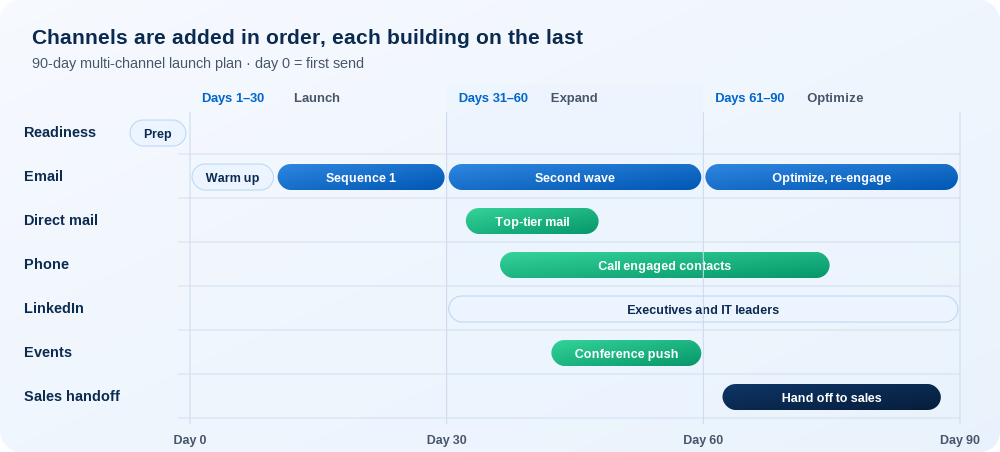
Not every account gets every channel. Use the full plan for top-tier accounts with the best fit. Lower tiers get the email sequences and an invitation to events. That keeps expensive channels, such as direct mail and rep calls, focused where they pay off.
Adjust the timing around your calendar. If a major specialty conference falls in month one, move the event push forward and start the email sequence earlier.
Three account tiers
| Tier | Who | Channels | Effort |
|---|---|---|---|
| Tier 1 | Best-fit accounts with a clear committee and likely need | Email, direct mail, phone, LinkedIn, events, sales follow-up | Account plan and weekly review |
| Tier 2 | Good-fit accounts or segments | Email sequences, event invitation, phone for engaged contacts | Segment-level review |
| Tier 3 | Lower-fit or unproven segments | Email only, then nurture | Monthly review |
Chapter 3: Days 1–30, Warm Up and Launch
The first month has two jobs: protect your sender reputation and find out which messages land. It's tempting to send to the whole list on day one. Don't. Start small, learn quickly and increase volume only while results stay clean.
Week 1–2: Warm up and test
- Start with your best segment. Send first to your highest-fit, highest-quality contacts. Good early engagement builds sender reputation.
- Ramp volume gradually. On a new domain or address, start with a small daily volume and raise it each week while bounce and complaint rates stay low.
- Test two messages per segment. Change one thing at a time: the subject line, the offer or the opening line.
- Watch every reply. "Wrong person" and "no longer here" replies show data or targeting problems early. Send them back to your data provider for replacement.
Week 3–4: Launch the full email sequence
A typical clinician or executive sequence runs four to five touches over three to four weeks:
| Touch | Timing | Purpose |
|---|---|---|
| 1 | Day 1 | Name their problem and offer one useful resource |
| 2 | Day 4–5 | A peer example from their specialty or type of organization |
| 3 | Day 10 | A different angle, such as evidence, cost or workflow |
| 4 | Day 17 | A low-effort ask: "Is this a priority this year?" |
| 5 | Day 24 | A polite close that leaves the door open |
A warm-up schedule for a new sending domain
| Week | Daily volume (illustrative) | What to watch |
|---|---|---|
| 1 | Small: your best-fit contacts only | Bounces below 2%, no complaints |
| 2 | Double the volume if week 1 was clean | Replies, wrong-person notices |
| 3 | Add the full first-touch segment gradually | Complaint rate, spam-folder placement |
| 4 | Full planned volume | Keep complaints well below 0.3%1 |
Increase only when results are clean, and pause if bounces or complaints rise. Google's rules apply once you send more than 5,000 messages a day to Gmail accounts, but they are a good standard at any volume.1
Top-tier accounts
For the accounts most likely to buy, start account mapping now. Identify each committee role and plan the multi-channel steps for days 31–60.
- Month one protects sender reputation and finds the messages that work.
- Start with your best segment and ramp volume gradually.
- Send every reply that says "wrong person" back to your data provider.
Chapter 4: Days 31–60, Add Channels and Events
By the second month, your best contacts have seen your name a few times. Now the aim is to turn that awareness into conversations. Add channels where they work best: direct mail and phone for top-tier accounts, LinkedIn for executives and IT leaders, and events for clinicians. The key is coordination. Each touch should refer to the last, so nothing feels like a cold start.
Direct mail
Direct mail stands out in healthcare because clinicians and executives receive far less of it than email. Use it for top-tier accounts only.
- Send a short, useful piece: a one-page clinical summary, a benchmark report or an event invitation
- Time it to arrive a few days before a phone call or email that refers to it
- Use the verified mailing address, and suppress anyone who has opted out of any channel
Phone
- Call contacts who opened or clicked but did not reply
- Refer to something specific they have already seen
- Use manual dialing to business lines, and follow the phone rules in our Compliant Healthcare Outreach Handbook
- Connect with executives and IT leaders who have engaged by email, with a personal note
- Share useful content rather than sending sales messages
- Do not use automation tools that break LinkedIn's terms
Events
Conferences are one of the best chances to meet clinicians in person. Use the weeks before a major specialty meeting to:
- Invite your segment to your booth, a dinner symposium or a scheduled meeting
- Send a reminder during the event
- Follow up within a week with a reference to the event
The MedicalProspects Event Audience Builder helps you build a pre-event audience for a specific conference.
Second email wave
Contacts who did not respond in the first month get a new sequence with a different offer. Do not repeat the first sequence.
- Month two turns awareness into conversations by adding channels in order.
- Direct mail and phone go to Tier 1 and to engaged contacts only.
- Each touch should refer to the last one.
Chapter 5: Days 61–90, Optimize and Hand Off
The third month is about focus. Put more effort behind what's working, stop what isn't, and make sure sales ends the quarter with a clear set of active conversations rather than a spreadsheet of "engaged" contacts nobody owns.
Optimize
- Rank segments by meetings per 1,000 contacts, not by open rate. Put more effort into the top segments.
- Retire weak messages. Keep the two best-performing messages per segment and write one new challenger.
- Check data quality. Compare bounce and wrong-person rates by segment. Report problems to your data provider for replacement.
Re-engage
- Contacts who engaged but did not book a meeting get a final, specific offer, such as a peer call or a short assessment.
- Contacts who never engaged move to a quarterly newsletter or nurture track. Continued cold outreach to them hurts your sender reputation.
Hand off
- Every meeting and engaged account is assigned to a named rep, with the conversation history attached
- Top-tier accounts get an account plan based on their committee map
- Agree what happens on day 91: which segments go into a second 90-day cycle, and with what changes
- Month three puts effort behind what worked and stops what did not.
- Rank segments by meetings per 1,000 contacts, not by open rate.
- Hand off every active account with the full conversation history.
Day-90 review agenda
- Results against targets, by segment and channel
- Pipeline created and its expected value
- What we learned about messages, offers and timing
- Data quality issues and how they were fixed
- Plan for the next 90 days
Chapter 6: Channel Playbooks: Mail, Phone, LinkedIn and Events
Chapter 4 introduced the channels beyond email. This chapter goes deeper on how to run each one well, because a badly executed phone call or a generic mailer can undo a lot of good email work.
Direct mail
| Piece | When it works | Cost control |
|---|---|---|
| One-page clinical or operational summary | Tier 1 clinicians and department heads | Print on demand; send to engaged contacts only |
| Benchmark or research report | Executives and finance leaders | Digital first; mail a printed copy to Tier 1 |
| Event invitation | Specialists in the conference city | Send three to four weeks before the event |
Always include a clear next step: a short URL, a QR code or a name to reply to.
Phone
- Prepare: read the contact's record and the emails they have opened.
- Open with a reference: "I sent you a short summary last week about [topic]."
- Ask one question: about their situation, not your product.
- Offer a small next step: a summary, a short call or an introduction to the right person.
- Log everything: outcome, next step and any new contacts mentioned.
- Connect with a personal note that names what you have in common or something specific you shared.
- Comment thoughtfully on their posts before you message.
- Share useful content, such as a clinical summary or a webinar, rather than a pitch.
- Never use automation tools that break LinkedIn's terms.
Events
| Stage | Action |
|---|---|
| Four weeks before | Build the attendee-area audience; send invitations |
| One week before | Send a reminder with a specific meeting slot |
| During | Follow up with people who engaged; host short meetings |
| Within a week after | Send a follow-up that refers to the event and offers one useful resource |
- Each channel has a specific job: mail gets attention, phone starts conversations, LinkedIn builds familiarity, events create meetings.
- Prepare each call from the contact's engagement history.
- Follow every event within a week.
Chapter 7: Email Templates by Role
The templates below share three simple rules: name the reader's world in the first line, offer one useful thing, and keep the ask small. They're deliberately short. Busy clinicians and executives decide in a few seconds whether to keep reading, and a short email with one clear idea gets read more often than a long one with five. Replace everything in brackets, and route clinical claims through your review process.
For a clinician (specialist)
Subject: [Procedure] cases and [specific constraint]

Dr. [Last name],

For [specialty] teams running [procedure], [specific constraint, e.g., lab time
per case] decides how many patients you can treat each week.

We put together a one-page summary of how [peer type, e.g., a community EP
program] approached it, including the [outcome measure] they tracked.

Would it be useful if I sent it over?

[Name], [Title], [Company]
[Postal address] · [Data-source notice] · [Unsubscribe]
For a hospital executive (CFO or COO)
Subject: [Cost or capacity problem] at [type of organization]

[First name],

Health systems of [Organization]'s size are under pressure on [specific problem,
e.g., denied claims or OR utilization].

[Peer organization type] reduced [measure] by [result from your evidence] within
[timeframe]. The model, with assumptions, is two pages.

Worth 15 minutes in the next few weeks, or should I send the model first?

[Name], [Title], [Company]
[Postal address] · [Data-source notice] · [Unsubscribe]
For an IT leader (CIO, CISO or CMIO)
Subject: [Product category] on [their EHR or platform]

[First name],

Teams running [their EHR or platform] usually ask two things about [product
category]: how it connects and how it is secured.

I have attached our integration overview and security summary, so your team can
review them before any conversation.

If it is relevant this year, who on your team should see it?

[Name], [Title], [Company]
[Postal address] · [Data-source notice] · [Unsubscribe]
Why these work
- The subject line names their world, not your product.
- The ask is small: a summary, a model or a referral, not a 45-minute demo.
- Technology context (their EHR or platform) comes from technology data, which makes the email relevant on the first line.
Chapter 8: Metrics, Funnel Maths and Targets
It's easy to drown in campaign data. Track a few metrics weekly, and judge the campaign on meetings and pipeline rather than opens. Open rates have become unreliable because many email clients load images automatically, so treat them as a rough signal at best. Replies and meetings are harder to fake.
Health metrics (check weekly)
| Metric | Why it matters | Action threshold |
|---|---|---|
| Hard bounce rate | Protects sender reputation | Investigate any segment above 2% |
| Spam complaint rate | Mailbox providers filter senders with high complaint rates | Keep well below 0.3%, ideally under 0.1% |
| Unsubscribe rate | Shows relevance problems | Rising rate in one segment: review targeting and message |
| Wrong-person replies | Shows data or targeting problems | Report to your data provider; check the segment definition |
The spam complaint thresholds reflect Google's sender guidelines.1
Results metrics (review every two weeks)
| Metric | Why it matters |
|---|---|
| Positive reply rate by segment | The best early sign that the message fits |
| Meetings per 1,000 contacts | Compares segments fairly, whatever their size |
| Accounts with 2+ engaged roles | Shows progress toward the buying committee |
| Opportunities and pipeline value | The outcome that justifies the campaign |
| Cost per meeting | Compares channels and segments by efficiency |
The funnel, worked backwards
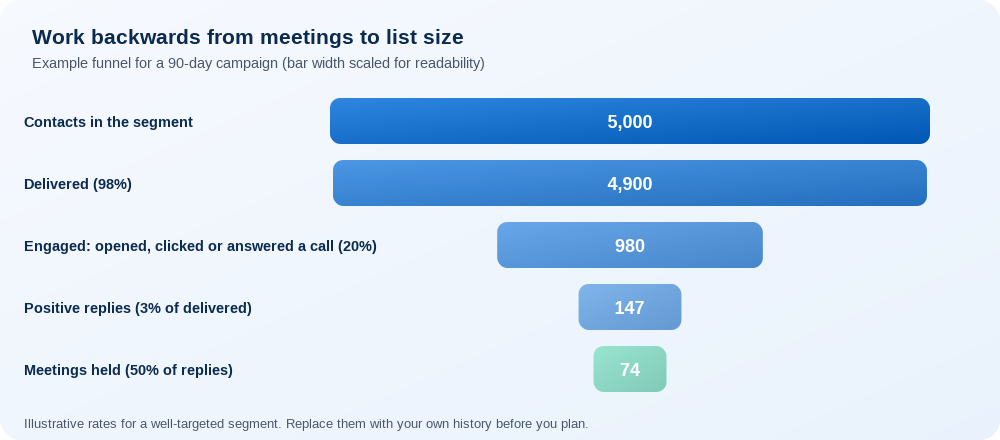
Start with the number of meetings you need and work back to the contacts required. The rates in the figure are illustrative; replace them with your own after the first 30 days.
| Step | Illustrative rate | Result on a 5,000-contact segment |
|---|---|---|
| Delivered | 98% | 4,900 |
| Engaged (opened, clicked or took a call) | 20% of delivered | 980 |
| Positive replies | 3% of delivered | 147 |
| Meetings held | 50% of replies | 74 |
Setting your own targets
Targets vary too much across products, segments and offers for any published benchmark to apply. Set yours from your own results:
- Use the first 30 days as your baseline for each segment.
- Set day-60 and day-90 targets as improvements on that baseline.
- Compare segments with each other, not with industry averages.
- Work backwards from pipeline: meetings needed = pipeline goal ÷ (average deal value × meeting-to-opportunity rate × win rate).
Fill in after day 30, using your own baseline.
- Meetings per 1,000 contacts, by segment:
- Day-60 and day-90 target for each segment:
- Pipeline goal and average deal value:
- Meetings needed to reach the goal:
- Track health metrics weekly and results metrics every two weeks.
- Judge the campaign on meetings and pipeline, not opens.
- Set targets from your own first-30-day baseline.
Chapter 9: When Results Are Below Plan
Almost every campaign hits a weak patch at some point. When it happens, the urge is to change everything at once: new list, new copy, new offer. Resist it. Diagnose the most likely cause first, fix that, and give it a week.
| Symptom | Likely cause | First fix |
|---|---|---|
| High bounces | Stale or poorly verified data | Pause the segment; send bounces to your provider for replacement |
| Many "wrong person" replies | Segment or role definition too loose | Tighten specialty and role filters |
| Few opens and replies, low complaints | Message or subject line misses the audience | Test two new subject lines and openings |
| Replies but no meetings | The ask is too big or the offer too weak | Offer a smaller next step |
| Rising unsubscribes | Wrong audience or too many touches | Review targeting; shorten the sequence |
| Rising complaints | Relevance problem or missing one-click unsubscribe | Pause; fix targeting and opt-out |
| Meetings but no pipeline | Wrong role or no buying authority | Add roles from the committee map |
- Match each symptom to its likely cause before you act.
- Fix data and targeting problems before rewriting messages.
- Change one variable at a time.
Ninety Days, One Plan
Pipeline rarely comes from one brilliant email. It comes from a sequence of well-timed touches across channels, aimed at a clearly defined segment and built on accurate data. Prepare properly before day 1, protect your sender reputation in month one, add channels in month two and focus on what works in month three. Then take what you learned into the next 90 days, which will be easier than the first.
Launch with MedicalProspects
Every channel in this plan depends on accurate contact data. MedicalProspects provides it:
- Verified business emails with a 99% deliverability guarantee and 1:1 hard-bounce replacement, to protect your sender reputation from the first send
- Direct dials and verified mailing addresses for phone and direct mail
- LinkedIn profile URLs for social outreach
- NPI, specialty and health system affiliation for precise segments and account mapping
- Technology and intent data to personalize messages and prioritize accounts
- The Event Audience Builder for conference campaigns, and the Audience Estimator to size each segment
- Delivery in 24–48 hours, re-verified monthly
Start with 20 free custom sample contacts for your first segment. Visit medicalprospects.com or email [email protected].
Appendix A: Week-by-Week Checklist
| Week | Focus | Must do |
|---|---|---|
| 0 | Readiness | Authenticate domain; load and suppress list; approve content |
| 1–2 | Warm up | Send to best segment; test two messages; review replies |
| 3–4 | Launch | Run full sequence; start account mapping for Tier 1 |
| 5–6 | Add mail and phone | Send mailers; call engaged contacts |
| 7–8 | Add LinkedIn and events | Connect with executives; invite to event |
| 9 | Second wave | New offer to non-responders |
| 10–11 | Optimize | Rank segments; retire weak messages; check data quality |
| 12 | Re-engage | Final offer to engaged non-bookers; nurture the rest |
| 13 | Hand off | Assign reps; run day-90 review |
Appendix B: Glossary
| Term | Meaning |
|---|---|
| Multi-channel | Reaching the same audience through more than one channel |
| Tier 1 / 2 / 3 | Account tiers that decide how many channels an account receives |
| Warm-up | Gradually increasing sending volume to build sender reputation |
| SPF, DKIM, DMARC | Email authentication standards that prove a message comes from you |
| Hard bounce | A permanent delivery failure, such as an address that does not exist |
| Spam complaint | A recipient marking your message as spam |
| Meeting rate | Meetings held divided by contacts reached |
| Suppression list | Contacts you must not email, call or mail |
| Account plan | A written plan for winning one account across its buying committee |
| Hand-off | Passing an engaged account from marketing to a named sales rep |
Sources
- Google Workspace Admin Help, Email sender guidelines. https://support.google.com/a/answer/81126

John Britton
John works with healthcare sales and marketing teams on precision targeting, campaign strategy, and audience intelligence solutions at MedicalProspects.
More ebooks →